Growth / ROBLOX
Roblox shop funnels: separating repeat visits from purchase outcomes
Plan analytics for a shop that a player opens several times in one game session. Give each attempt its own funnelSessionId, define observable steps, and keep item views separate from unconfirmed purchases.
Choose a question about a recurring flow #
Imagine a practice-item shop where a player opens the window, views a card, closes it and returns later. A single “visited the shop” record cannot explain both attempts. The first might end at viewing while the second reaches a purchase request. Start with a question that needs separate visits: where do individual attempts stop progressing?
We use a fictional PracticeShop funnel to design measurement for a future game, not report our games' performance. No AnalyticsService events were sent, purchases performed or game code changed for this article. It contains no measured conversion figures. Agree on the meaning of an attempt and every step before implementing their observation.
Define the boundaries of one attempt #
Describe the start rule: which confirmed shop opening creates a new attempt? Then define closing, moving between sections and returning. Switching item cards may remain inside the same visit; that is a project decision. Do not create another attempt for each interface frame or change of selection.
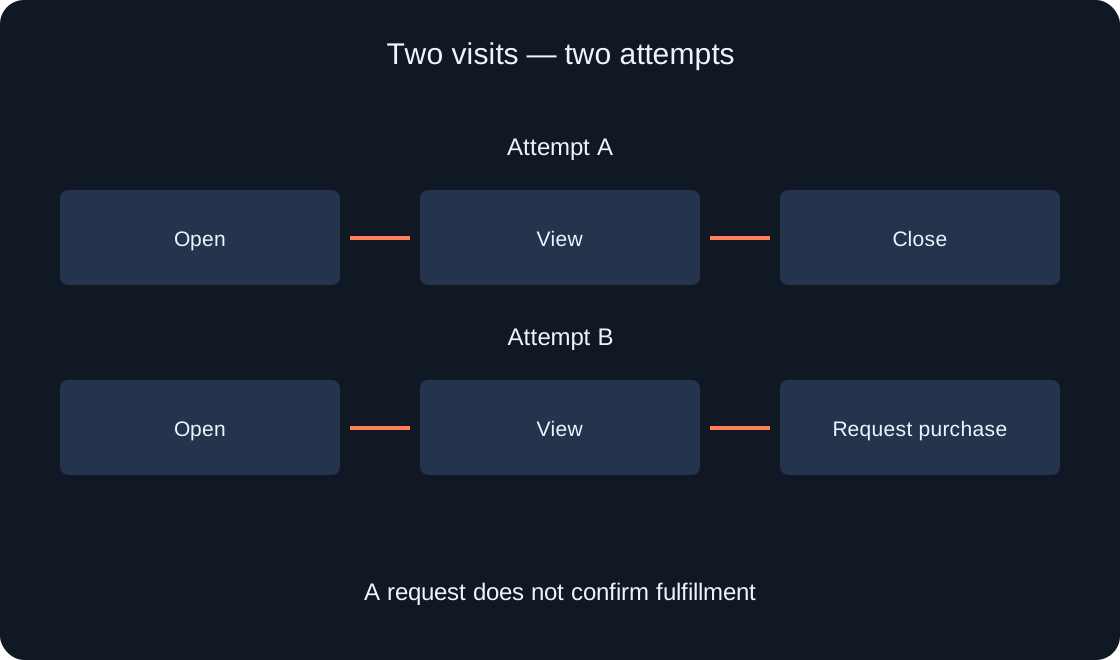
In our example, closing the shop ends attempt A and reopening starts attempt B. This boundary lets you check the design using ordinary actions. Record it with the funnel version. If the boundary changes later, old and new events need an explanation instead of appearing to describe a single unchanged flow.
 Open full-size image ↗
Separate player identity from attempt identity #
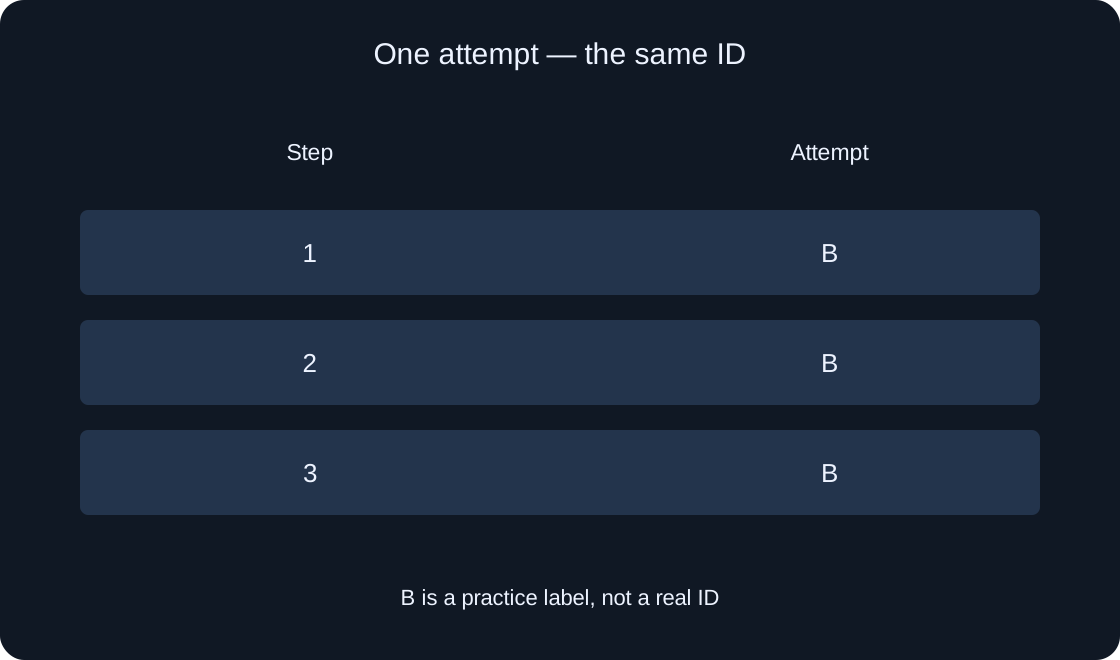
In a recurring funnel, funnelSessionId connects the steps of one attempt and distinguishes it from another attempt by the same player. One game session can contain several shop visits. “Same player” and “same attempt” therefore describe different relationships that the record should preserve.
The labels A and B in the diagram are fictional markers, not actual session identifiers. A chosen new scenario needs a new ID, while its following steps use that same ID. Two opposite mistakes are worth planning for: a constant ID merges visits, while a fresh ID at every step breaks the sequence. Check these before relying on a chart.
 Open full-size image ↗
Write a dictionary of observable steps #
Give each step a number, short name and precise completion condition. For example, ShopOpened means the agreed opening, ItemViewed means the selected card was shown, and CheckoutRequested means the intended purchase flow began. These are illustrative names. Two developers should agree on the exact moment an event may be recorded.
A final GrantConfirmed step means confirmed fulfillment only if a separately verified purchase and grant system exists. It is not completed by a button press, an opened payment dialog or a closed dialog. If fulfillment is not ready, keep the practice funnel limited to viewing. An honest limited measurement is more useful than a complete-looking funnel with an invented ending.
| Illustrative step | What it confirms |
|---|---|
| ShopOpened | The agreed opening |
| ItemViewed | Selected card shown |
| CheckoutRequested | Purchase flow started |
| GrantConfirmed | Confirmed fulfillment only |
Identify the server source of each event #
The documentation permits these analytics events from the server in published games, not Studio or the client. Separate interface observations from the server's decision that a step is valid. A reported item view, for example, should belong to an existing attempt and an allowed step rather than an arbitrary client-supplied number.
Create a map containing the condition, confirming server logic, step number and ID. This article is not a ready-made shop or universal validator. The map makes implementation work explicit. A game operation and its analytics observation are also distinct: recording a step should not itself grant an item or create permission to receive one.
Check repeated instances of a step #
An item card may be shown again within the same attempt. Documentation says the funnel considers the first occurrence of a repeated step, while repeated submissions still consume rate-limit capacity. A chart without doubled counts does not prove that the handler runs only once or avoids unnecessary work.
Plan separate cases for showing the same card again, selecting another card and reopening the shop. These are three different actions. Record the ID and step number used for each and compare them with the chosen scenario boundary. Avoid meaningless repeated submissions just to make a report look active; every observation needs a clear reason.
Preserve the meaning of skipped steps #
A later funnel step can automatically complete earlier steps in the report. That does not establish that your handlers actually observed every earlier action. If grants appear but shop openings are rarely logged, inspect event conditions and order before interpreting the result as player behavior.
Include a proposed case with a missing early step and record the expected reporting behavior separately from the actual-call log. This is not a reason to submit fictional achievements. The purpose is to discover a broken route or incomplete observation. Keep known game actions distinct from what the analytics tool infers from a later event.
Trace two visits in the record #
In the first proposed scenario, the player opens the shop, views an item and closes it without buying. In the second, they reopen the shop and begin the intended purchase flow. The record should distinguish A from B and show the order within each attempt. A purchase request in the second visit is still not payment or fulfillment.
For each attempt, keep its illustrative marker, start, used step numbers and ending reason. Log fulfillment only after your own system confirms it. The table gives a plan and expectations rather than performed gameplay results. The author checks event submission in a suitable published environment; no real analytics events were sent for this guide.
Interpret reports with version and period #
Compare the report with the step dictionary and scenario version. After changing the definition of opening or renaming a step, choose a period belonging to the relevant version and mark the update boundary. A mixed period can hide a change in meaning even when step numbers stay the same.
Documentation also limits tracking to the ten most recent unique funnelSessionId values per player and funnel. Do not treat this mechanism as an unlimited attempt archive or reuse an old ID to resume a long-closed visit. A research conclusion needs real data and a clear sample. Neither is supplied here, so no increase in purchases is claimed.
Hand another developer a clear specification #
Share the question, attempt boundaries, dictionary, server-condition map, ID rules and the two proposed visit records. Include checks that have not yet been run. Another chat can then implement measurement without guessing what “purchase” means or confusing a game session with a shop visit.
A measurement design does not guarantee improved sales or replace fulfillment handling. Website goals observe different actions and cannot confirm in-game purchases. This material supplies original diagrams and proposed checks, with no payments, actual conversions or modifications to our games. Verify the implementation before interpreting its observations.
| Specification | Record |
|---|---|
| Boundary | Start and end of an attempt |
| Dictionary | Number, name and condition |
| Source | Confirming server logic |
| Version | Date and meaning change |
Original sources
Roblox Creator Hub — Funnel eventsRoblox Creator Hub — AnalyticsService API